Point of sale

A checkout that moves as fast as your team

Every service, product, tip, discount, gift card and loyalty point on one ticket, with the technician on every line and nothing lost when the internet drops.

Feature by feature

Everything at the counter

The whole floor on one screen
Service Board

The whole floor on one screen

Who is in service and for how long, who is waiting, who is next and how many tickets are open, with the main queue of technicians on the side.

  • Service, waiting list, tickets and turns in tabs
  • Minutes in service on every ticket
  • Search tickets, technicians and clients
Built around the technician
Tickets

Built around the technician

Pick services and products from your menus, put any technician on any line, and move a ticket to another technician without starting over.

  • Notes on every item: the colour, the shape, the request
  • Hold a ticket while the client decides
  • Combine tickets for a group
Every way to pay, on one ticket
Checkout

Every way to pay, on one ticket

Cash, cards, checks, gift cards, loyalty points and your own tender types, split however the client likes.

  • Tips split between technicians
  • Ticket and item discounts, promotions and codes
  • Taxes worked out for you
Card payments
Cash, counted for you
Cash payments

Cash, counted for you

Tap CASH and choose what the client handed over: the exact amount, the next round amounts, or anything on the keypad. EraPOS shows the change to give back before the ticket closes.

  • Exact amount and the next round bills in one tap
  • GIVE CHANGE or NO CHANGE TO GIVE, in large type
  • Every cash payment counts in the day's expected cash
Fix a ticket after it closed
Ticket Adjustment

Fix a ticket after it closed

Put the right technician on a line, correct a price, a discount, a payment or a tip, add a ticket that was never rung up, or remove one, even on a day you already closed.

  • Commission and fees worked out again, as at the register
  • Every change in the Activity Log: what, who and which register
  • Only for roles with the Fix tickets permission
Your receipt, your words
Receipts

Your receipt, your words

Design the receipt section by section, with a live preview: your header, the store details, the items, the totals and a thank-you note.

  • Layouts for the close-out and technician reports too
  • Print a test before saving
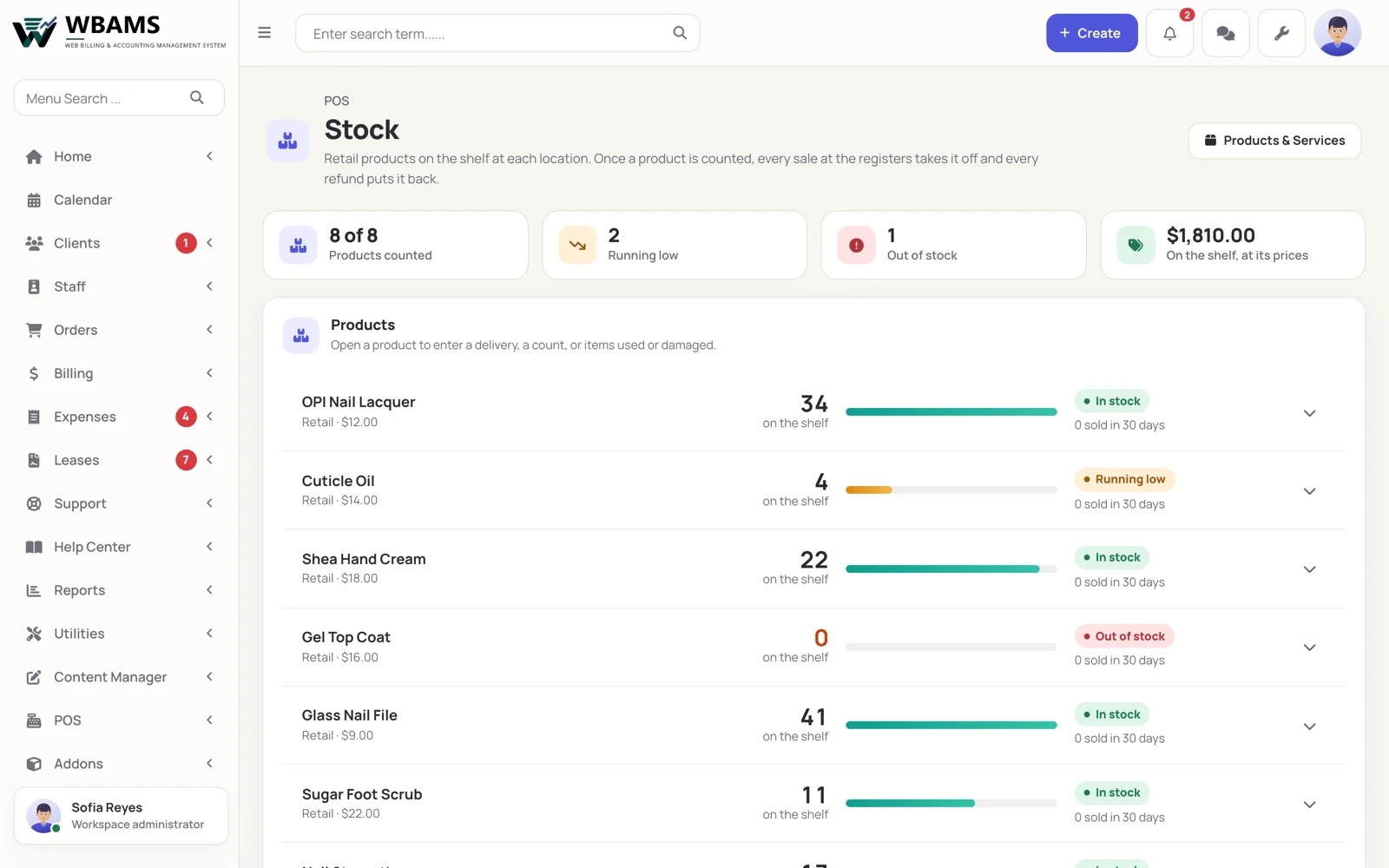
Retail stock with products running low
Retail stock

A shelf that counts itself

Every retail sale at your registers takes one off the shelf, and every refund puts it back. Enter deliveries, counts and damaged items in the back office.

  • A low mark for each product
  • A daily email while something runs low
  • Sold in the last 30 days, at a glance
Services and products, your way
Your menu

Services and products, your way

Menus by category with prices, turn values and supply fees, for services and retail alike.

Back office
The Help window on the Employees screen, with the chapter about employees
Help on every screen

The answer is one tap away

A Help button sits in the top bar of each screen. It opens the course chapter about that screen, at the moment it is shown, in English, Spanish, Vietnamese or Swedish.

  • The right chapter for every screen
  • Starts at the part that matters
  • The register remembers your language
Also at the counter

The small things that save the day

Fast Sale with a PIN Each employee rings up with their own PIN, so every sale has a name on it.
Gift cards Sell and redeem on the ticket and check a balance from the header.
Loyalty on the ticket Points earned and redeemed as clients pay.
Refunds and voids With a reason from your own list, always on record.
Cash drawer Cash paid in and out, on record, and the drawer opened from the register.
Several registers Registers share tickets live; a ticket open on one is locked on the others.
A client on every ticket Turn it on and a ticket can be paid only once it has a client, so every visit counts toward their points.
Open tickets carry over A ticket still open at midnight moves to the next day's board, marked with the day it was opened.
Help videos on every screen One tap opens the chapter about the screen you are on.
A number pad for every password POS passwords type on the register's own pad, never the Windows keyboard.
Change your mind at Change Due Took cash by mistake? Cancel, and pay another way.
Services first, the client after Ring up what they want, then choose who they are.
Retail stock Counted down by every sale, back up by refunds.
Packages at the register Use a prepaid visit or a membership visit on the ticket.

Questions

About the point of sale

A Windows PC at the front desk runs the store server and the first register. More registers can join from a browser on your store network.

Yes. Each line has its own technician, and tips can be split between them.

Checkout keeps working with cash and other tenders, and everything is in step when the connection is back. Card readers need the internet.

Yes. Products sit on their own menus next to services, with product commission for the technician who sells them.

Ring up your first ticket

Ask us anything about the checkout, from split tips to gift cards.

Powered by WBAMS